Skip to content

Business context

Findings in the language of the business.

During set-up you tell armor360 what your machines do, which business processes they serve and who to call. From then on, every verdict and campaign says what is at risk in words the business uses.

Archive made by hand on linux04CriticalWhat made the archive?tar, started from a web user’s shellIs that normal for this machine?No: backups here run as another accountWhat happened just before?Files gathered into /tmp minutes earlierWhere did it connect next?Outbound to a host never seen beforeWhat does threat intel say?No reputation yet: first seen todayWhat it foundProcessContextFilesNetworkIntelVerdictReal attackConfidenceHigh, backed by 5 cited recordsRecommends: check linux04 and the web account. Your team decides.
Illustrated example, after our lab investigation. armor360 recommends; your team decides what to do.

A host name is not a risk.

Security tools speak in machines and accounts. The people who decide speak in services, customers and deadlines.

  • Which machine is this?

    An alert on “linux04” means nothing to a manager until someone explains what linux04 does.

  • Everything looks equal

    Without context, an alert on a test box and one on the payments server arrive with the same weight.

  • Who should know?

    Finding the owner of a machine at night can take longer than the investigation itself.

  • Knowledge walks out

    What the team knows about the estate lives in people’s heads, and leaves when they do.

From a host name to what is at risk.

What you tell armor360 at set-up travels with every finding about the machine.

What the machine means to the businessFrom our lab
linux04Linux serverCustomer onboardingBusiness process: highEnd-of-day settlementBusiness process: highOperations teamOwner, on call
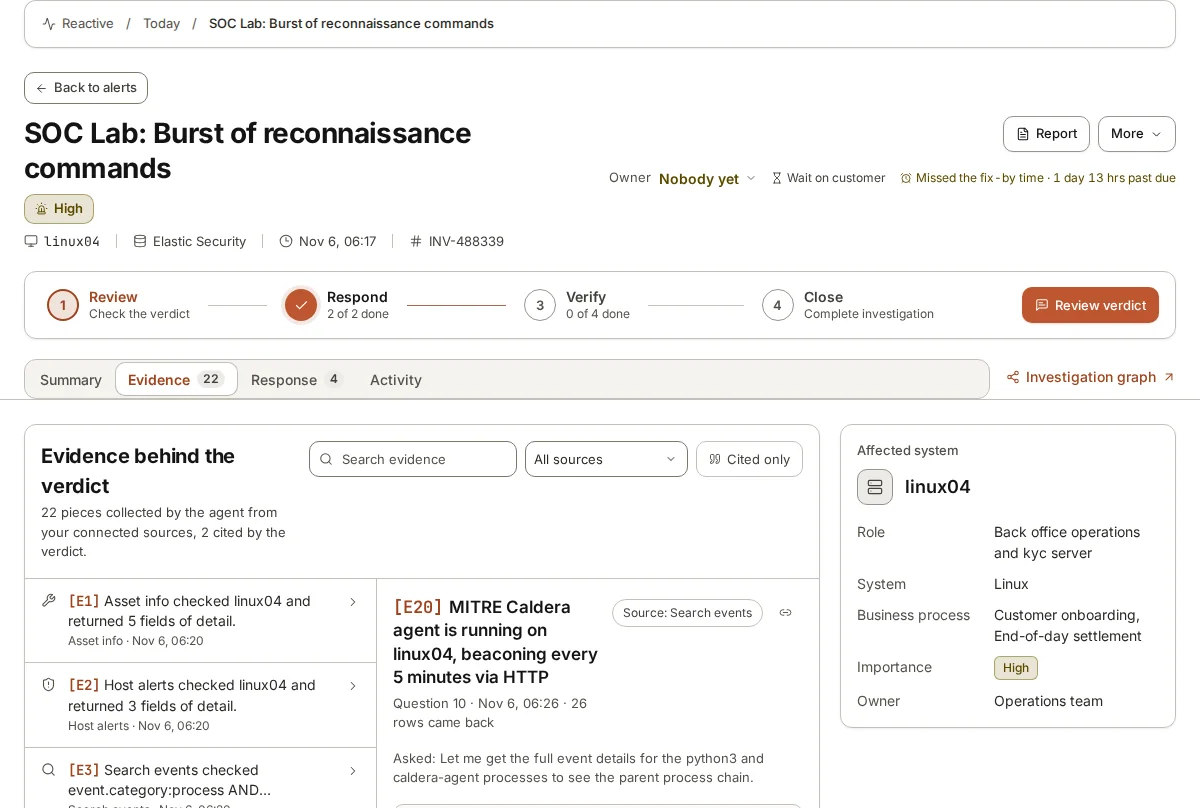
From set-up: what linux04 runs for the company and who owns it. The verdict on the lab attack said so beside the evidence.

Set up once, used every time

Set-up asks about your business, not just your logs: what each group of machines is for, which processes depend on them, which systems are your crown jewels and who to contact for urgent findings. You answer in plain language.

  • What each machine does
  • The business processes it serves
  • Your most important systems
  • Who to call, and how

Evidence beside the business

When the agent investigates, it sees what the machine runs for you. In our lab, the affected machine served customer onboarding and end-of-day settlement, and the verdict said so beside the evidence.

Campaigns show what is at risk

A campaign lists the business processes and important systems the attack has touched, so a decision can be made on what matters rather than on how many alerts fired.

Your corrections become knowledge

When a reviewer says “that job runs every night, it is ours”, armor360 keeps it. The next alert about the same thing starts from what your team already knows.

Investigated in your business’s terms.

A typical SOC works one technical alert at a time. armor360 knows which machines matter to your business and why, so it weighs every finding by what it puts at risk, and shows you where your defences stand.

  • Business context in every investigation

    Set-up asks what your business runs on. Each investigation sees how important the machine is, who owns it and whether it is a crown jewel, and each attack is scored by the business processes it puts at risk.

  • A MITRE ATT&CK report in minutes

    See which of more than 700 ATT&CK techniques your rules and logs cover, which are blind and what would close each gap, and download it as a PDF. Built from your live data, not a questionnaire.

  • A SOC maturity assessment

    A score out of 100 across ATT&CK coverage, log collection, business context and data sources, on five levels from Initial to Optimised, with a before-and-after report. The platform’s own score, not a formal audit.

0 to 32

ATT&CK coverage, out of 100, in about an hour, not weeks. In our lab, set-up took one company’s coverage from 0 to 32 within 62 minutes of connecting Elastic. Lab result, not customer data.

How business context works.

  1. 1

    Describe your estate

    During set-up you say, in plain language, what each group of machines does and which business processes depend on it, such as customer onboarding or end-of-day settlement.

  2. 2

    Mark what matters most

    You name your crown-jewel systems and the people to contact for urgent findings, with the channel each one prefers: Slack, Microsoft Teams, PagerDuty or email.

  3. 3

    Context joins the investigation

    When an alert touches one of those machines, the agent reads its business role beside the evidence, and the verdict says what is at risk in business terms.

  4. 4

    Reviewers add to it

    When a person corrects a verdict and explains why, such as a known nightly job, armor360 keeps that context for later investigations about your company.

Context that travels with every finding.

  • Crown jewels marked

    The agent knows which systems you marked as most important when it investigates.

  • Business processes

    Verdicts and campaigns name the processes a machine serves.

  • Contacts on file

    Urgent findings go to the people you named, through the channel you chose.

  • Authorised activity

    Known jobs and people are recognised as authorised, with the reason kept.

  • Reports for the business

    Findings can be shared as reports written for the people who receive them.

  • Kept per customer

    For providers, each customer’s context stays inside that customer’s tenant.

Business context, by hand and with armor360.

TopicBy hand todayWith armor360
Knowing the machineWhat a server does is often known only by the people who built it, or kept in a spreadsheet few people open. What each machine does is recorded once at set-up and read by the agent whenever that machine appears in an alert.
Stating the riskFindings are reported in host names and addresses, and someone has to translate them for the managers who decide. Verdicts and campaigns name the business processes and important systems at risk, in words the business already uses.
Finding the ownerAt night, tracking down who owns an affected machine can mean searching old tickets and messaging colleagues. Urgent findings go to the contacts you named during set-up, through the channel you chose for them.
Known activityEach analyst learns which jobs and accounts are expected by tripping over them, often more than once. Authorised jobs and people are recognised from earlier corrections, with the reason kept beside the verdict.
When people leaveKnowledge of the estate leaves with the person who held it, and the team relearns it slowly. Context and corrections stay in armor360, so what the team knows carries on when someone moves on.

Frequently asked questions

How long does set-up take?

Most of it is answering questions about your company in plain language: what your machines do, which processes they serve and who to contact. You can start with the most important systems and add the rest over time; investigations use whatever context is there.

Does the business context leave our environment?

Not if you run armor360 on-premises. The platform and its AI model can run on your own hardware, and the context you give it is stored there. For providers, each customer’s context is kept inside that customer’s tenant.

What if our estate changes?

You update the context when it changes, and reviewers add to it as they correct verdicts. Corrections are remembered for later investigations, so the picture stays current through normal use.

See where your team’s time goes. Then decide.

Start a free pilot on your own alerts, or put in your own numbers first.