Skip to content

Alert investigation

A plain verdict, with the evidence behind it.

The agent works through an alert the way an analyst would: what raised it, which machine and person it touches, what else happened nearby and what is known about the places it connected to. It ends with a verdict your team can check.

Archive made by hand on linux04CriticalWhat made the archive?tar, started from a web user’s shellIs that normal for this machine?No: backups here run as another accountWhat happened just before?Files gathered into /tmp minutes earlierWhere did it connect next?Outbound to a host never seen beforeWhat does threat intel say?No reputation yet: first seen todayWhat it foundProcessContextFilesNetworkIntelVerdictReal attackConfidenceHigh, backed by 5 cited recordsRecommends: check linux04 and the web account. Your team decides.
Illustrated example, after our lab investigation. armor360 recommends; your team decides what to do.

An investigation is a lot of small questions.

Each one needs a search in a different tool, and the answers have to be put together before a person can say what happened.

  • Tool after tool

    The SIEM, the endpoint console, the asset list and threat intelligence each hold part of the answer, behind a different search.

  • Skills that are scarce

    Knowing which question to ask next comes with years of practice, and the people who have it are the hardest to hire.

  • Work nobody can check

    An investigation that lives in one person’s searches cannot be reviewed, repeated or handed over.

  • No business picture

    A machine name says little. What matters is what the machine does for the company, and that is rarely in the alert.

Follow the path to the verdict.

The map of a real investigation from our lab, drawn as the agent worked: every source it read, every question it asked, and the path that backs the verdict.

How the agent reached its verdictFrom our lab
AlertMachineData sourcesQuestionsVerdictBurst of reconlinux04Asset infoHost alertsSearch eventsCheck indicatorsbackoffice, pscat, grepcaldera-agentpython3+ 9 moreReal attack, 90%
Our lab investigation of a hidden adversary-simulation agent: 4 data sources, 13 questions, 22 records kept, and a verdict of real attack at 90% confidence. The red path is what backs the verdict.

Real attack, suspicious, harmless or not sure

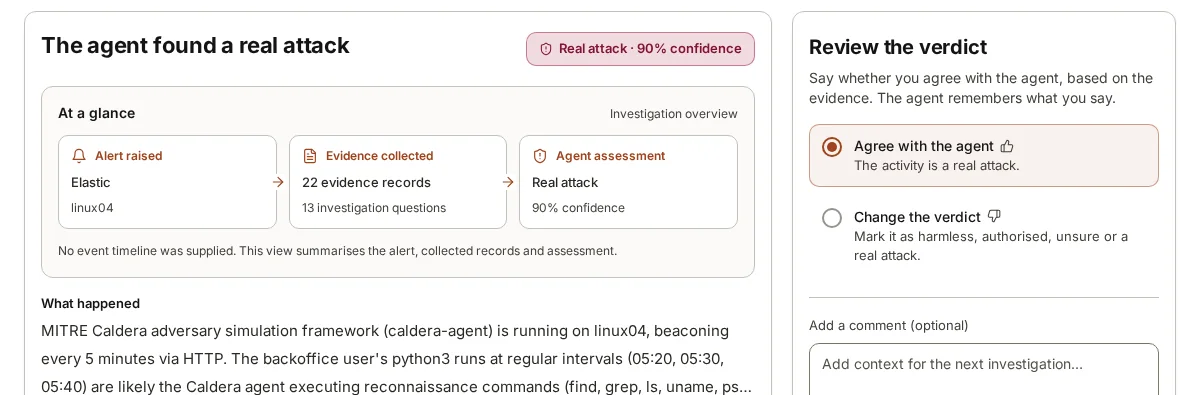
Each investigation ends in a plain verdict and how sure the agent is, with a short account of what happened in words a manager can read. In our lab, it found a hidden adversary-simulation agent beaconing every five minutes and called it a real attack at 90% confidence.
Every question it asked, on a map

The investigation map lays the work out in columns: the alert, the machine and accounts in it, the data sources the agent read, each question it asked, the verdict and the next steps. The path that backs the verdict is drawn in red, so you can follow it from the alert to the conclusion.

Evidence cited where it is used

Every record the agent collected is kept, numbered and cited in the sentence that relies on it. A reviewer can open the log line, lookup or event behind any claim, beside what the machine does for your business.

Your team reviews the verdict

A person reads the result, then agrees with it or changes it. What they say is remembered for the next investigation about your company, so the agent learns your normal.

  • Agree with the agent
  • Change the verdict: harmless, authorised, unsure or a real attack
  • Add context for next time

Recommendations, not actions

It recommends what to do next, such as checking other machines for the same activity or keeping the logs. Your people decide and act; armor360 does not.

13questions asked
22records kept as evidence
4data sources read
90%confidence: real attack
5m 35sfrom alert to verdict

Lab results, not customer data: one of our deepest investigations, of an adversary-simulation agent on a Linux machine. Across all our lab runs the median is 76 s.

How an investigation works.

  1. 1

    Start from the alert

    The agent reads the rule that fired, the triggering event, the machine, the account and the time, and works out which questions need answering first.

  2. 2

    Ask and answer

    Each question becomes a search or a lookup: events in the SIEM, the process chain, other alerts on the host, user activity and threat intelligence on any indicators.

  3. 3

    Keep the record

    Each record it reads is kept and numbered. An answer can raise a new question, and the agent stops when the evidence is enough to make a call.

  4. 4

    Hand over a verdict

    A person gets the verdict, the confidence, a plain account and recommended next steps, with each claim cited. They review it, then decide and act themselves.

What the agent checks.

  • Events around the alert

    Searches the SIEM for what the machine and account did before and after the alert.

  • Process chains

    Follows parent and child processes to see what started what.

  • Other alerts on the machine

    Reads the machine’s recent alerts to see whether this one is part of something larger.

  • Threat intelligence

    Looks up addresses, domains, hashes and names in MISP, VirusTotal, AlienVault OTX and AbuseIPDB.

  • The machine and its owner

    Asset details, who uses the machine and what it runs for the business.

  • What it has learned

    Corrections and context your team gave on earlier alerts about your company.

An investigation, by hand and with armor360.

TopicBy hand todayWith armor360
Gathering dataThe analyst moves between the SIEM, the endpoint console, the asset list and threat-intelligence sites, copying details from one to the next. The agent runs the searches and lookups itself across the connected data sources, and brings the answers together in one place.
Choosing the next stepWhat to check next depends on the analyst’s experience, so two people may work the same alert quite differently. The agent decides what to check next from what it has just found, and the map shows each question it asked.
The recordSearches live in browser tabs and personal notes, and much of the working is lost once the alert is closed. Each record the agent read is kept, numbered and cited in the sentence that relies on it.
Business impactThe analyst has to find out what the machine does, often by asking around, before the risk can be stated. The verdict says which business processes the machine serves, from what you told armor360 during set-up.
ReviewChecking a colleague’s conclusion usually means repeating their searches, so reviews are rare and often skipped. A reviewer follows the red path on the map and opens the cited records, then agrees with the verdict or changes it.

Frequently asked questions

How does the agent decide what to check?

It starts from the alert: the rule that fired, the machine, the account and the time. From there it asks itself questions an analyst would ask, such as what else ran on the machine, what started the process and whether an address is known to be bad, and answers each with a search or lookup.

Each answer can raise the next question. When the evidence is enough, it writes the verdict. In our lab investigation it asked 13 questions and kept 22 records as evidence.

Can I trust a verdict written by AI?

You do not have to take it on trust. Every claim in the verdict cites the record behind it, and the map shows every question the agent asked, including the ones that found nothing. A person reviews the verdict before anything happens.

The agent also says how sure it is, and says so plainly when the evidence is not enough.

What happens after the verdict?

The agent recommends next steps, for example reviewing other machines for the same activity or keeping the logs from the affected one. Urgent findings reach the people you chose, by chat, paging or email. Your team decides what to do and does it with its own tools; armor360 takes no action on your systems.

Does it work with my SIEM?

armor360 investigates using the data you already have. With Elastic Security, the agent searches your logs during an investigation, where they already live. Splunk, Microsoft Sentinel, CrowdStrike Falcon and Microsoft Defender send their alerts in, and the agent works from those alerts, threat intelligence and the business context you gave it. Nothing has to be moved or copied into a new store first.

See where your team’s time goes. Then decide.

Start a free pilot on your own alerts, or put in your own numbers first.