Skip to content

For in-house security teams

More alerts looked into, without more hires.

Much of an analyst’s day goes on checking alerts that turn out to be nothing. armor360 takes that first look for you, so your people spend their time on the alerts that need a decision.

Overnight, looked into as it happened182022000204060808:00On-call told01:38, real attackEach with its verdict06:30 Local accounts listed05:11 Update agent beacon03:36 DNS to new domain02:18 Admin logon at 02:2001:23 Archive made by hand00:11 New cron entry08:00, the morning summary10looked into1needed someone2to check today
Illustrated example: each alert looked into as it arrives; the one that matters reaches the person on call; your people decide what to do.

A small team, a long list.

Most in-house teams are a handful of people looking after everything, and the alert queue is only one of their jobs.

  • The queue never empties

    New alerts arrive faster than a few people can check them. Each one needs the same routine of lookups and searches before a person can tell whether it matters, and the routine eats the day.

  • Hiring does not keep up

    Experienced analysts are hard to find and slow to bring up to speed. Adding people to the alert queue is expensive, and the queue keeps growing while you look.

  • Knowledge walks out the door

    Which server is the payroll system, which admin always logs in late, which scanner is allowed: this lives in people’s heads. When someone leaves, the team relearns it the hard way.

  • Real work gets pushed back

    Hardening systems, tuning rules and hunting for what was missed all wait while the team clears alerts. The work that would make next month quieter rarely gets started.

The first look, already done.

Your analysts start from a finding that already says what the machine does for the business and what is at risk.

What the machine means to the businessFrom our lab
linux04Linux serverCustomer onboardingBusiness process: highEnd-of-day settlementBusiness process: highOperations teamOwner, on call
From set-up: what linux04 runs for the company and who owns it. The verdict on the lab attack said so beside the evidence.

Start the day from a finished first look

The Today page opens on what is waiting for a person, real attacks first. Each alert already has the agent’s verdict, how sure it is and the reason, so your team starts by reading conclusions rather than raw events. The routine checks have been done; what is left is the judgement.

Investigated the way an analyst would

For each alert the agent asks itself questions and answers them from your data: what ran on the machine, who was signed in, what else fired nearby, and what is known about the addresses involved. Every record it uses is kept and cited, so a person can check the working.

  • Searches of the events in your SIEM
  • Process and parent chains on the machine
  • Other alerts on the same host
  • Threat-intelligence lookups of indicators

Your people make the call

A person reads each verdict, then agrees with it or changes it to harmless, authorised, unsure or a real attack. armor360 recommends what to do next. It does not change your machines, accounts or network: your team decides and acts, and the record shows who approved what.

What your team knows, kept

During set-up you tell armor360 what each machine does and which business processes it serves. Corrections your people add later are remembered for the next investigation about your company. What your team knows stays with the team, even when someone moves on.

One list of what needs you

Approvals, alerts to check and detection rules to review sit in one place, most urgent first. Nobody has to keep a separate list or remember which tool holds which task. A person who has twenty minutes can see straight away where those twenty minutes count most.
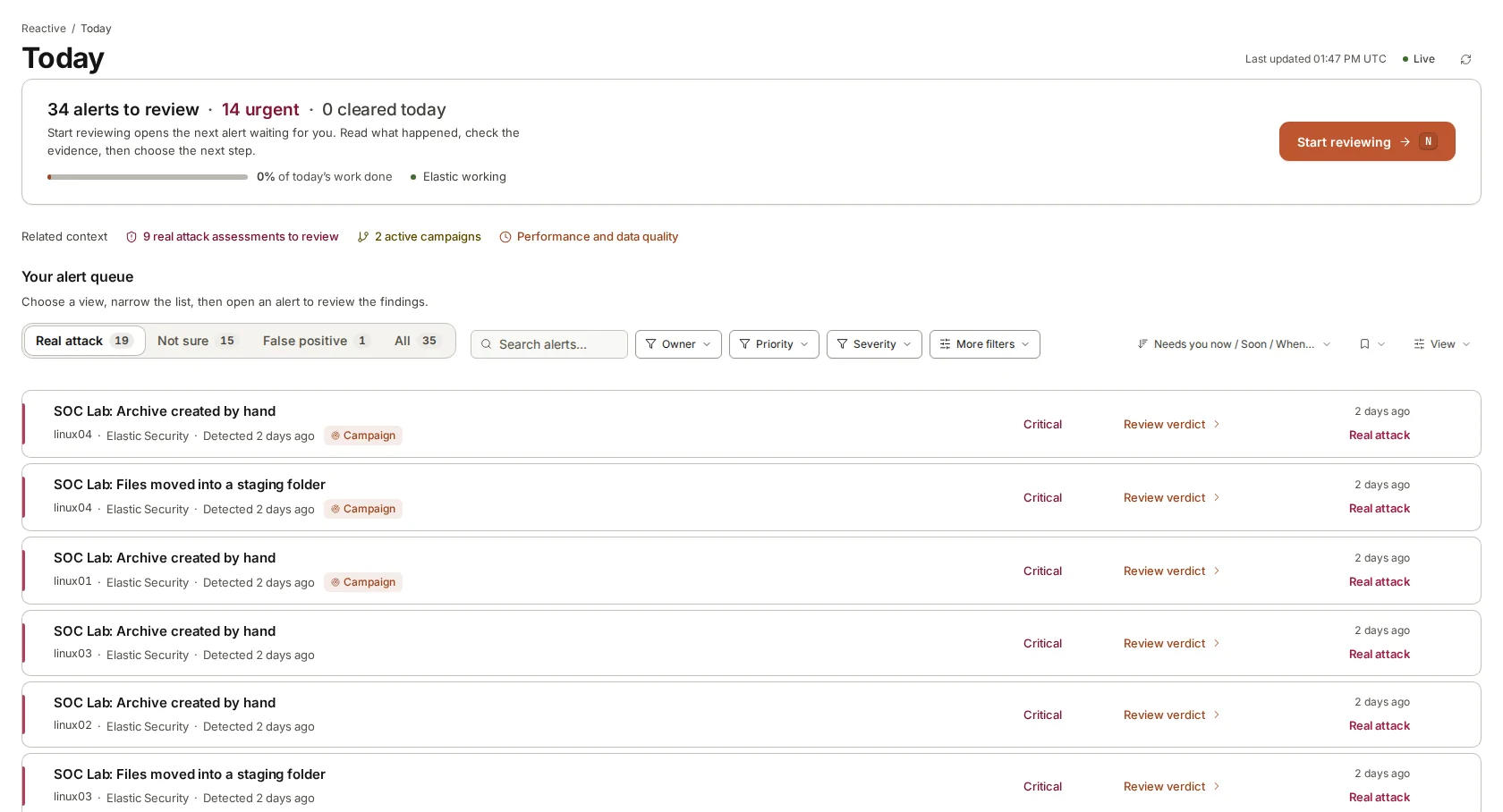
How it fits a small team.

  1. 1

    Connect your tools

    Connect Elastic Security or the other tools you run, and tell armor360 what your important machines do and who to call when something is urgent.

  2. 2

    The agent works the queue

    New alerts are collected and investigated as they arrive. Each gets a verdict, how sure the agent is and the evidence, and real attacks rise to the top.

  3. 3

    Your team reviews

    People open the Today page, read the verdicts that need them first, and agree with or correct each one. Corrections are kept for later investigations.

  4. 4

    Time goes on judgement

    With the routine gathering done, the team has more time for confirming real attacks, tuning rules, hunting and the hardening work that keeps getting pushed back.

What a small team gets.

  • Plain verdicts

    Real attack, suspicious, harmless or not sure, with how sure the agent is and a short account a manager can read.

  • Evidence cited

    Every record the agent collected is kept and linked where it is used in the verdict.

  • Attacks joined up

    Alerts from the same attack are joined into one campaign, so the team works the attack once.

  • Hunts and rules

    Hunt packs for what rules missed, and rules checked against past alerts before they go live.

  • Coverage gaps

    Machines that went quiet are listed with the likely cause and the steps to fix them.

  • Findings where you work

    Urgent findings go to Slack, Microsoft Teams, PagerDuty or email, and tickets to Jira or ServiceNow.

A small team’s day, by hand and with armor360.

TopicBy hand todayWith armor360
Start of the dayThe team opens the queue and starts on whatever arrived overnight, oldest first, with no judgement made yet. The Today page opens on what needs a person, with each alert already investigated and given a verdict.
Routine checksEach alert needs the same lookups in several tools, repeated by hand many times a day. The agent runs those lookups itself and keeps each record, so people read conclusions instead of gathering data.
Local knowledgeWhich jobs and accounts are normal lives in a few people’s heads, and leaves when they do. Business context from set-up and the corrections your people make are kept and used in later investigations.
Project workRule tuning, hunting and hardening wait while the team clears alerts, and often never start. Hunt packs and rule testing are ready to use, and time freed from routine checks can go to them.
Cost of growthMore alerts usually means asking for another hire, with a long wait before the new person is up to speed. Pricing is by quote, sized to what you protect, with no charge per person on the team.

Frequently asked questions

How much effort is it to set up?

You connect the tools you already run, such as Elastic Security, and tell armor360 about your company: what your important machines do, which business processes they serve and who to call when something is urgent.

That business context is the part worth taking care over, because it is what lets verdicts say what is at risk in your terms. You can add to it at any time, and every correction your team makes later adds to it too.

Will it take actions on our systems?

No. armor360 detects, investigates and recommends. It does not change machines, accounts or network settings. When an attack needs a coordinated plan, each step waits for a person to approve it, and the audit trail records who approved what and when.

That keeps decisions about your systems with the people accountable for them. The agent’s job is to make those decisions quicker and better informed, with the evidence already gathered.

How does it fit with the tools we already have?

It works from the alerts your existing tools raise. With Elastic Security, the agent also searches your logs during an investigation, where they already live, so nothing is moved first. Splunk, Microsoft Sentinel, CrowdStrike Falcon and Microsoft Defender send their alerts in, and the agent works from those alerts, threat intelligence and the business context you gave it.

Findings go where your team already looks: Slack, Microsoft Teams, PagerDuty, email, Jira, ServiceNow or a webhook. Sign-in works with Okta, Microsoft Entra ID or any OIDC provider.

How is it priced?

Pricing is by quote, sized to what you protect, with no charge per person. Your whole team can use it without each new account adding to the bill. Tell us about your environment and we will send a quote.

As a guide to running cost, an investigation uses about $0.10 of compute. That is an estimate of what it costs to run, not a price.

See where your team’s time goes. Then decide.

Start a free pilot on your own alerts, or put in your own numbers first.