The knowledge that is not in the logs
The most useful facts in a security investigation are often not in any log. The nightly job that copies the finance share to a backup server. The administrator who runs a discovery script every Monday. The supplier whose engineers connect over a jump host on the first Tuesday of the month. A new analyst learns these over weeks, usually by getting them wrong once and being told. This post explains how armor360 learns them from the people who review its verdicts, and why what it learns stays with your company.
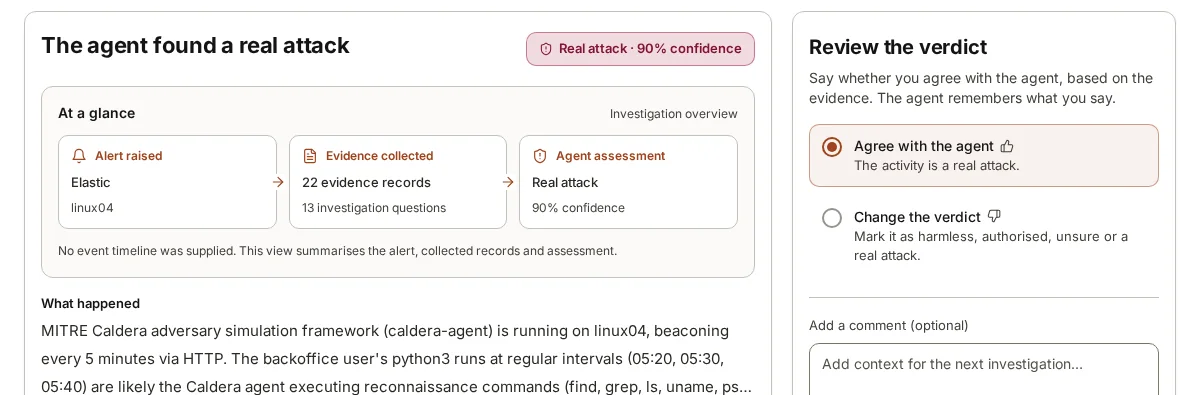
The mechanism is plain. A reviewer reads a verdict, agrees with it or changes it, and can add a note in their own words. armor360 remembers that correction and that context, and brings it into later investigations about the same company.
That makes review more than a quality check. Each time a reviewer explains why a verdict should change, the next investigation of a similar alert starts from a better place. Over the first weeks, the alerts that were confusing because of something local tend to become the ones the agent explains well, and reviewer time moves to the alerts that are genuinely new.
Agreeing, changing and adding context
Every verdict comes with a review panel. A reviewer can agree with it, or change it to harmless, authorised activity, unsure or real attack. Agreement is worth recording too: it confirms that the agent’s reasoning on that kind of alert holds up in your environment.
Changing a verdict is where most of the learning happens, and it is most useful when the reviewer says why. “Harmless” alone tells the agent it was wrong. “Harmless: this is the backup service account, and the copy to the archive server runs every night at one” tells it what to look for next time and why the behaviour is expected.
Context can also be added when the verdict is right. A reviewer might agree that a logon was authorised activity and add that the account belongs to the contractor running the network refresh until the end of the quarter. That makes the next verdict faster and, once the quarter ends, gives a reviewer a reason to look again.
Context that helps most
Not all notes are equally useful. The ones that help later investigations most describe a pattern of normal behaviour precisely enough to recognise it again, and say who is responsible for it. Here are illustrative examples of the kind of context that pays off.
- A scheduled backup job: which account runs it, from which machine, to which destination, and at what time. Without this, a large overnight file copy looks like data collection.
- An administrator’s routine: “Our IT lead runs a script every Monday morning that lists all domain users and groups for the access review.” Without this, it looks like account discovery.
- A software deployment tool: which server pushes installers, and that it creates services on target machines. Without this, remote service creation looks like lateral movement.
- A vulnerability scanner: its address and its scanning window. Without this, it looks like a network sweep.
- A supplier’s access: which accounts they use, through which host, and when. Without this, an external engineer’s logon looks like a stranger.
- A known exception: “This old application server runs an unsigned binary from a temporary folder; the vendor is replacing it next year.”
How remembered context is used
When a later alert arrives, the agent investigates it as usual: it asks its questions, queries the data and keeps the records. What changes is that it also has the corrections and context reviewers gave for your company. If the new alert matches what a reviewer described, the agent can say so in its reason, and the reviewer can see which earlier correction it drew on.
Memory informs a judgement; it does not switch the judgement off. If the backup account copies data at one in the morning to the usual archive server, a reviewer’s note makes that easy to call harmless. If the same account copies data at three in the afternoon to an address outside your network, the note does not cover it, and the agent should treat it on its evidence. This is why precise notes matter: “backup jobs are fine” is a blanket that hides too much, while “the backup account copies the finance share to the archive server nightly at one” is a fact that can be checked.
Memory also needs looking after. Routines change, contractors leave and servers are retired. Reviewers should change a verdict that leaned on out-of-date context and say what has changed, so that the newer fact is the one remembered.
Writing a good correction
A correction is read twice: by the agent in later investigations, and by a colleague, or an auditor, who wants to know why a verdict was changed. Write it so both can use it. Short is fine; vague is not.
Compare two illustrative notes on the same alert, a large file copy from a finance server at night. The first says “known activity, fine”. The second says “backup service account svc-backup copies the finance share to the archive server every night between one and two; owned by the infrastructure team”. The first tells the agent nothing it can match next time and tells an auditor nothing they can check. The second names the account, the source, the destination, the time and the owner, so the next alert can be compared against each of those facts, and any one of them being different stands out.
- Name the account, machine or tool, not just the behaviour.
- Say when it normally happens and where it normally goes.
- Say who owns it, so the next reviewer knows whom to ask.
- Add an end date for anything temporary: a project, a contractor, a migration.
- If you are not sure, say so. “Probably the new monitoring tool, checking with IT” is more honest than a confident guess, and a reviewer can update it later.
Why corrections stay with that company
Corrections are remembered for later investigations about the same company. They are not shared across companies. In a multi-tenant installation, such as one run by a managed security provider, each tenant has its own people, connections, settings and audit trail, and its corrections belong to it.
There are two reasons. The first is accuracy. One company’s normal is another company’s attack. A remote administration tool that one organisation uses every day might be exactly what another has banned. If a correction from the first taught the agent to relax about that tool everywhere, the second would be worse off.
The second is confidentiality. A correction often holds sensitive facts: the names of administrators, the layout of backup systems, the accounts suppliers use. That is information about how a company works, and it should not leave the company it came from.
Where armor360 fits
In armor360 a person reviews each verdict, agrees with it or changes it, and can add context. Those corrections are remembered for later investigations about the same company and kept within that company’s tenant. Who reviewed what, and when, is kept in the audit trail.